How to Find Hidden Spy Apps on Android Phones

Updated:

Most of us store very important and private information on our phones. From family pictures and videos to banking passwords and PINs, the last thing you would want is for this information to end up in the hands of a hacker.
One of the most common ways a hacker would get into your phone and get access to this information would be if they were able to install a hidden spy app on your Android device.
Android phones have a reputation for being more vulnerable to hacking compared to iOS devices. This is partly since Android devices are more open and can be customized more easily. This makes it simpler for a hacker to install a hidden spy app.
With this in mind, we have put together a guide telling you how to find and recognize hidden spy apps or spyware on your Android phone and how to get rid of them.
There are two main routes to take to identify hidden apps; performing a series of manual checks or alternatively using a spy detector app, such as the free app Certo Mobile Security to sweep your phone in one easy step.
Free spy detector app for Android
Certo Mobile Security crushes spyware, stops intruders and keeps you safe online.


Signs of Hidden Spy Apps on Android
There are certain things that can indicate hidden spy apps are installed on your phone.
While these signs may not necessarily mean there are malicious apps on your phone, they are certainly something to look out for.
Your Android phone is rooted, and you didn’t do it
Rooting is the process of breaking through some of the security restrictions on your Android device to gain greater control over it.
While rooting is not particularly difficult to do, it does require some technical knowledge and will not be something that can happen to your Android device by accident.
If you find that your phone or tablet is rooted and it wasn’t you who did it, there is a good chance that your device has been hacked.
Though malware can be installed on your Android device without rooting, inbuilt security measures prevent some features of the hidden spyware from being used to their full potential.
For this reason, hackers who want to gain access to certain functions or data on your phone will often root the device first to give them this control.
If you think your device may have been rooted, the free Certo Mobile Security app can check and scan for any hidden spyware that may be present.
Your phone has sudden or unexplained high data usage
Spyware apps typically work by sending a large amount of data from your Android phone to the spyware provider’s servers to be accessed by the hacker.
They can also often tap into your phone conversations, location, or SMS messages in real-time. Therefore, your data usage will definitely increase if your phone has to send all this information out.
If your phone uses much more data than you think it should, it may have been compromised, and it might be time to try to find any hidden spy apps.
Someone knows too much about you
It sounds strange, but if you find that someone seems to know where you’ve been before you tell them or who you’ve been talking to without you sharing that information, they may just be monitoring your phone activity.
We all think of hackers as being criminals and strangers, but an alarming amount of hidden spyware is installed by those closest to the victim for personal as well as financial reasons.
Someone close to you may be easily able to physically access your phone and install spyware or hidden tracking apps without your knowledge.
Other signs of spy apps for Android
Other strange behavior to look out for if you are concerned that there may be a spy app on your phone include:
- Your phone getting unusually hot: Performing all of the tasks required for spying may cause your device to work harder, leading to an increase in temperature.
- Your phone taking longer to shut down: Your Android smartphone can only shut down when all the current processes are complete. Most spy apps will run many processes, and it may take longer for your phone to shut down.
- Your battery runs out quickly: The extra processes hidden apps will run may drain your battery faster than normal.
Types of Invisible Android Spyware
There are several different types of spyware that can find their way into your phone. Let’s run through these so that you can understand what you should be looking for.
Commercial spyware
There is a relatively large market out there for off-the-shelf commercial spyware. Some popular examples include mSpy, FlexiSpy, and XNspy.
These apps can be bought for as little as $30 and easily be installed on someone’s Android phone for secretly tracking, monitoring, and recording all of their activity.
This type of app can easily be hidden after installation, making it completely invisible to the owner of the phone. Most give the hacker the option to hide it as part of the functionality of the app, but even if this is not the case, an app can still be easily hidden on an Android by following some simple steps.
Misuse of legitimate apps
There are many features and apps on an Android phone that are designed to be useful to the user. But unfortunately, even a legitimate app can be abused by a hacker to spy on you secretly.
Legitimate tracking apps
Cell phone tracking apps like Life360, FindMyKids, and Family Locator are designed for concerned individuals to keep track of their children or other family members or friends.
They are useful for anyone wanting to check things like whether their child got to school safely or for a group of friends organizing a meet-up.
However, if a hacker or stalker could install this on someone’s Android phone without their knowledge, they could use it to track their GPS location without the victim knowing anything about it.
Maps and navigation apps
Apps like Google Maps often have a function that allows you to share your location with another user of the same app.
This is great for finding your friends, but not so good if a hacker or stalker gets hold of your Android phone.
They could easily set your phone up to share your location with them at any time, which could be dangerous for you.
While misuse of legitimate apps like these can’t give a hacker as much information as commercial spyware can, they can still be a threat to your safety.
These methods are becoming more popular as they require only short-term access to the victim’s phone, cost nothing, and are easy to hide.
Zero-day spyware
Zero-day spyware is the term used to describe previously unknown threats and vulnerabilities that hackers are already exploiting.
Occasionally, these take the form of a spyware app.
One example of a zero-day vulnerability that hackers were exploiting dates back to 2019 and allowed hackers to take full control of Android phones.
Victims were taken in by a phishing attack that led them to download a malicious app or visit an infected website.
The app or website was carefully engineered to look legitimate, meaning that in many cases, victims did not know that they were being hacked until it was too late.
You can read our blog here on the importance of vigilance against phishing attacks and how to spot them.
How to Find Hidden Spy Apps on Android
Now that we have identified the types of invisible spy apps that could be lurking on your Android phone, we’ll tell you how to find them and, more importantly, how to remove hidden spy apps.
The easiest way to find hidden spyware or other malicious software on your phone is by using security scan apps such as Certo Mobile Security, which can be downloaded from the Google Play Store for free.
Detect and destroy spyware
Certo Mobile Security finds and removes hidden spyware fast! Get it for FREE from the Play Store now.
However, you can also find hidden apps on your Android phone by doing a manual check. Here is what you should look out for when trying to find Android spy apps.
1. Look for unrecognized apps
Many of us have folders of downloaded games or apps that we may have used for a short time and then forgotten about.
A quick check through all installed apps on Android phones is a simple way to find tracking apps or spyware. But be aware that it is possible for a hacker to make spy apps invisible on the device.
To check all installed apps:
- Open the Settings app.
- Tap Apps or Manage Apps.
- Scroll through and review your list of installed apps.
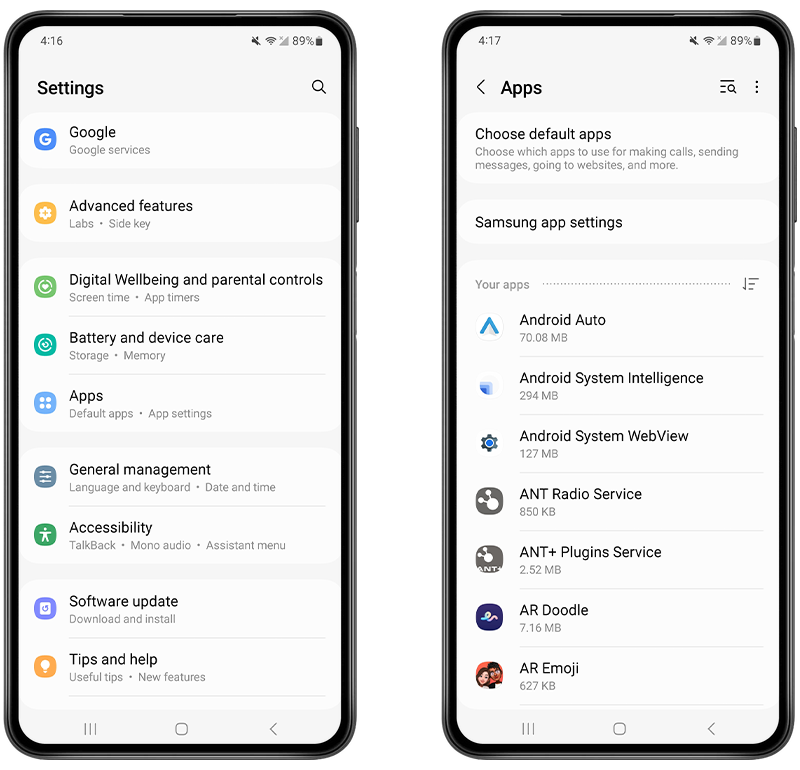
Fig 1. Reviewing installed apps on Android.
It’s also important to remember that there are some apps that come pre-installed on your Android.
If in doubt about suspicious apps, do some research on Google to find out if the apps that you don’t remember downloading are a normal part of the Android operating system.
2. Check your app permissions
This could potentially be a little more time-consuming to do manually, but it is important to find out which apps have access to your microphone, camera, or location data.
This could reveal whether an app is secretly tracking you without your knowledge or permission, making it a pretty reliable indicator for identifying hidden spy apps.
If you don’t have time to go through these manual steps, you can install the Certo Mobile Security app, tap on Privacy Audit, and view the list of apps you have installed, along with which ones are accessing your GPS location, camera, microphone, or other device functions.
To manually check which apps have access to your device functions, follow the steps below:
- Open your Settings app.
- Tap Security and privacy.
- Tap Privacy.
- Tap Permission Manager.
- Tap each permission to see which apps have access and adjust accordingly
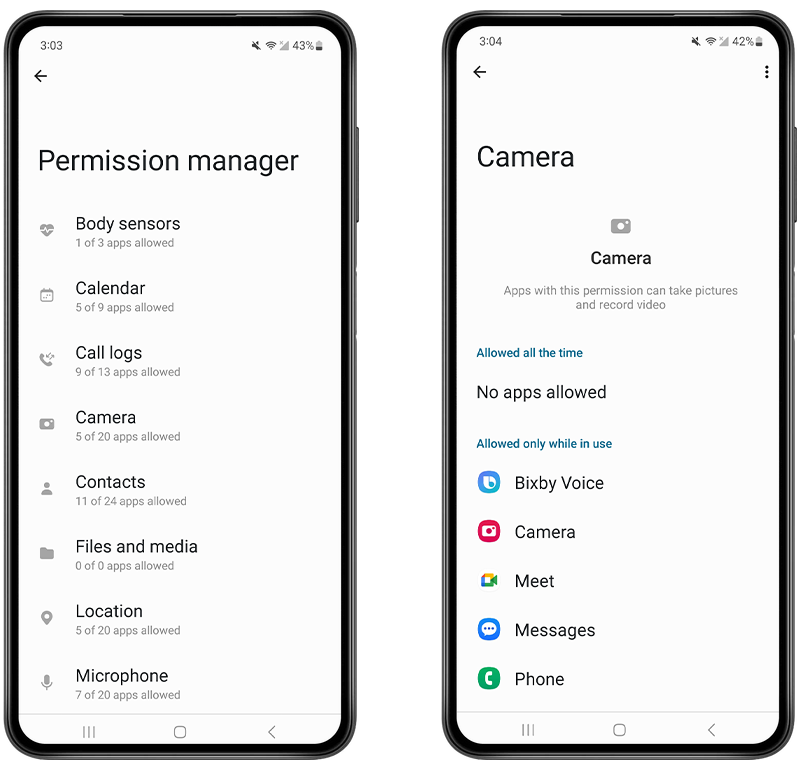
Fig 2. Reviewing which apps have access to the camera on Android.
3. Keep an eye on your location symbol
Android devices let you know when an app is using your device’s location by displaying a small symbol in the notification bar at the top of the screen.
If you notice that this location symbol is constantly appearing, but you aren’t using any apps that can access your location data, it could be a sign that a hidden spy app is running in the background and tracking your location.
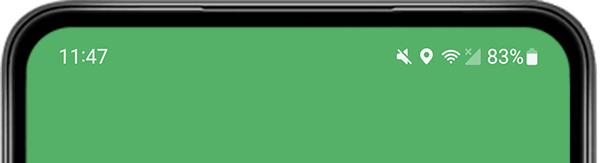
Fig 3. The location icon appearing on Android.
4. Check if Google Play Protect is disabled
Google Play Protect is Android’s built-in virus and malware scanner.
It is designed to run in the background to automatically scan every app that is downloaded onto your Android phone for viruses or malicious apps.
The default setting for Google Play Protect is for it to be turned on. If it is off, it may be because someone has installed hidden apps on your phone and needed to switch the protective scanner off to allow them to do it.
To check your Google Play Protect settings manually:
- Open the Google Play Store app.
- Tap your profile in the top right and choose Play Protect.
- If Play Protect is disabled, you’ll see an option to Turn on.

Fig 4. Checking if Play Protect is disabled on Android.
5. Check for Device Admin apps
The Device Admin permission on Android grants special elevated access to the device and its features. It is intended for enterprise users giving them a way to manage company-owned devices.
However, spy apps will also often require this access in order to monitor your activity and collect your private data. Checking your device for any unrecognized Device Admin apps can be a useful way to reveal a spyware app.
To check for Device Admin apps, follow these steps:
- Open your Settings app.
- Search for “device admin” and tap Device admin apps in the results.
- Tap Device admin apps.
- Look for any apps you don’t recognize.
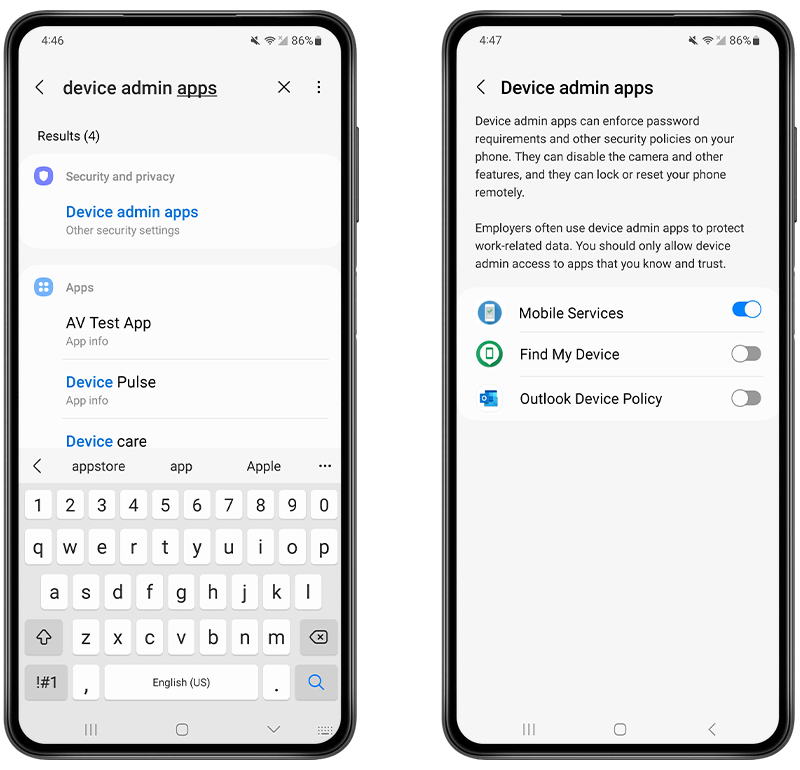
Fig 5. Locating device admin apps on Android.
Final Thoughts
If you are suspicious and think someone might be targeting you with cell phone tracking, do not ignore it.
You may want to go through the steps outlined above to check your phone for any unapproved activity.
Or even better, you can download our free app, Certo Mobile Security, from the Google Play Store to sweep your phone for spyware and check all these settings and permissions in one simple step.
Frequently Asked Questions (FAQs)
How do I find hidden spy apps on my phone?
You can use spyware detection apps like Certo Mobile Security, which can be downloaded from the Google Play Store for free, to run a scan on your phone to find hidden spy apps.
What names can spy apps be hidden under?
If you are concerned about hidden apps installed on your Android smartphone, some common spy app names to look out for are:
- XNSPY
- Cocospy
- FlexiSpy
- PhoneSpector
- Auto Forward
- Highster Mobile
- Daddy’s Eye
Where would I find spy apps on my Android?
Go through all the apps on your phone, including the ones in folders, to see if there are any you don’t recognize.
You can also check your app permissions to see which apps can access your camera, microphone, and location data.
Finally, you should check that Google Play Protect is always activated on your mobile phone.
Sophia is a Senior Content Manager at Certo Software, showcasing her deep-rooted expertise as an accomplished writer in the tech industry. With a genuine passion for cybersecurity, Sophia is a trusted source of insight and information.