How to Detect mSpy on an Android Phone

Updated:

As our readers may be aware, the proliferation of commercial spyware has made it increasingly easy for individuals with minimal technical expertise to engage in hacking activities. This has led to a significant increase in the frequency of hacking incidents in recent years.
The availability of spyware at a relatively low cost, as low as $30, has further exacerbated this trend, making it increasingly important for individuals and organizations to be vigilant in protecting themselves against these types of cyber threats.
Free anti-spyware for Android
Download Certo Mobile Security from the Play Store now to find and remove spyware such as mSpy.


What is mSpy?
The most popular version of this commercially available spyware is called ‘mSpy’. mSpy is a software product that touts itself as being the ‘ultimate monitoring software for parental control’.
The problem is that some people aren’t using this software just for parental control. Something the company appears to be well aware of based on a recent advert seen on Twitter promoting mSpy as a way of spying on your partner.

mSpy have two main products for Android:
- mSpy Android Monitoring, which is their main product (and the most intrusive of the two), only available via their website.
- mLite Family Phone Tracker, which is their ‘lite’ version of their software, available on Google Play.
Let’s take a look at both of these versions and talk about why they are a threat to your digital security.
mSpy Android Monitoring – approx $30 per month
As mentioned above, this is mSpy’s main product and is only available via their website. The main difference with this app is that it has a lot more features compared to the lite version and allows much more in-depth monitoring and tracking.
Here’s a list of the main features:
- Track call history – This allows a hacker to see the call history of a user’s phone and view the numbers they have recently contacted.
- Spy on chats – By tracking apps such as Facebook Messenger, WhatsApp, Snapchat and others, this feature allows a hacker to view a full history of conversations between two users, that would otherwise be completely private.
- Read text messages – Similarly to the above feature, this feature allows a hacker to view all text messages on the device.
- Track GPS location – This feature allows a hacker to remotely keep track of the location of the victim’s phone.
- Monitor web browsing – This allows the hacker to track every single website visited on the device along with bookmarks, date/time visited, duration spent on websites, and also allows the hacker to completely block any site they choose.
- View all media content – This feature allows the hacker to remotely view and download all media on the phone such as pictures, videos, audio files, etc.
- And more! – Yes, there are even more features of this software – all of which are designed to intrude on your privacy.
As you can see, this software is actually really powerful considering the price a hacker would pay to get access.
One thing worth noting, unlike iPhones, an Android device does not need to be Rooted for many of these features to work. This makes installation a lot easier for the hacker when the victim has an Android phone or tablet.
mLite Family Phone Tracker – Free
As opposed to mSpy’s main Android spyware product we looked at above, this is a fairly simple app designed to do one thing – track your location.
If a hacker installs this onto your device, then they will be able to see where your device is at all times.
Obviously, this isn’t as useful for a hacker compared to the full version, but this is really easy to install (as easy as downloading any other app on the Play store).
Android security, made simple
Download Certo Mobile Security for FREE from the Play Store now.
Find and remove spyware such as mSpy in seconds.
How to detect mSpy on Android
It’s not always easy to detect mSpy without the help of a dedicated app, especially if the person who installed it took steps to hide it.
mSpy Android Monitoring
The full version of mSpy is designed to be hidden from the user, and does this very well.
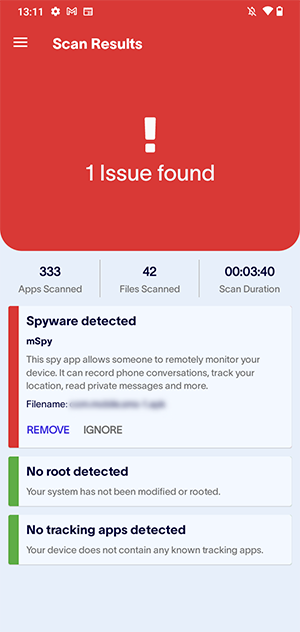
That’s why we have developed our own Certo Mobile Security app designed to help Android users detect and destroy privacy-invading spyware, including both versions of mSpy.
On top of that, our app can also find and fix insecure system settings that put your phone at risk, prevent unauthorized access to your data and help keep you protected online. All of which will help to reduce your risk of a potentially devastating privacy breach.
If you would like to know more about our app and the features that we have custom-built for the Android mobile operating system, just click here.
mLite Family Phone Tracker
This is fairly simple. It’s not possible to hide mLite, so just have a look at your installed apps. If you see it, all you would need to do is just delete the app and it will not be able to continue tracking your location.
To stay safe in the future, it’s recommended to only allow location tracking on your phone for apps that you know need it (e.g. maps, etc).
Frequently asked questions (FAQs)
How can I tell if mSpy is on my phone?
Both versions of mSpy for Android are apps installed directly on the device. It’s worth noting, however, that these apps can be hidden, making them harder to spot.
Firstly, look for apps on your phone called mLite or Update Service and make sure to check app folders too. If this search doesn’t identify mSpy, you may want to run a full scan with an anti-spyware app, such as Certo Mobile Security. This can find mSpy and many other spy apps, even if they have been made invisible.
How can I remove mSpy from an Android phone?
In most cases, mSpy can be removed like any other app, as long as you are able to locate it. Just find the app on your home screen, long press on it and then tap Uninstall.
Certain versions of mSpy may have Device Admin permissions on your device, making it more difficult to uninstall. In this case, you will need to head over to the Settings app and search for “device admin” then tap on Device admin apps, find the app and disable the permission. You can then uninstall the app as normal.
Alternatively, our free app Certo Mobile Security can remove mSpy and other threats from your Android phone with a tap of a button. Download it from the Play Store here.
What are spy apps disguised as on Android?
Spy apps will often use misleading names in order to disguise themselves as legitimate apps on the victim’s phone. Here are the names that the top 4 Android spy apps use to go unnoticed:
- Update Service = mSpy
- Sync Service = Hoverwatch
- Phone Tool = SpyToMobile
- Sync Services = FlexiSpy
Sophia is a Senior Content Manager at Certo Software, showcasing her deep-rooted expertise as an accomplished writer in the tech industry. With a genuine passion for cybersecurity, Sophia is a trusted source of insight and information.