How To Detect FlexiSpy For iPhone

Updated:
Are you concerned about the privacy of your iPhone? Have you ever heard of FlexiSpy?
In today’s digital age, smartphones have become an essential part of our daily lives. Unfortunately, they can also be used as a tool for spying and monitoring our activities. FlexiSpy is one such popular iPhone spyware app that allows a hacker to monitor and control their target’s device.
This blog post will discuss how to detect FlexiSpy on your iPhone and safeguard your privacy. We’ll cover various methods to detect and remove this spyware, including using anti-spyware tools, reviewing installed apps, and checking for a jailbreak.
What is FlexiSpy?
FlexiSpy is one of the most popular iPhone spying and monitoring solutions available, with prices starting at $29.95. For this, they provide up to 150 spying features, including: conversation recording and listening in, access to SMS and IM Chats, GPS location, Internet history, camera roll and many more.
Providing someone has access to your phone or tablet FlexiSpy is easy to install and can be made invisible to the owner of the device.
We have seen FlexiSpy used in many different scenarios to steal data from devices, including someone spying on their partner/spouse, employers monitoring their employees and corporate espionage. Do you think someone could be using FlexiSpy to monitor your iPhone?
Check your iPhone for FlexiSpy
Find and remove FlexiSpy with Certo AntiSpy, our award-winning iPhone spyware detection tool.
FlexiSpy Capabilities
FlexiSpy claims to have the following features available when monitoring an iPhone or iPad with their software:
| Spy on Calls | Listen to live calls, Record calls, Call logs, VOIP Call logs, VOIP Call Recording, Listen to phone surroundings, Record phone surroundings, Facetime Spy Cam |
|---|---|
| Spy on Messages | Read SMS messages, Read MMS messages, Send fake SMS messages, Delete SMS messages containing keywords Read Emails |
| Spy on Passwords | Spy on Passcodes, Spy on Application passwords, Spy on Email passwords |
| Spy on GPS | View & Track GPS location |
| Spy on IM Chats | WhatsApp, Facebook Messenger, Viber, LINE, Skype, WeChat, iMessage, BBM, Yahoo Messenger, Snapchat, Hangouts, KIK, Telegram |
| Spy on Multimedia | Video files, Image files, Audio files |
| Spy Remotely | Take a picture using the camera, Restart Device, Check device battery status, SMS Remote Commands |
| Spy on Internet | Web pages viewed, Bookmarks |
| Spy on Applications | Address book, Calendar, Notes, Installed Programs, Program Activity |
How to detect FlexiSpy on your iPhone
Checking if FlexiSpy is installed on your iPhone or iPad can be tricky as the developer has taken steps to try and ensure that their spyware remains hidden. However, despite this, there are still a number of ways that you can detect FlexiSpy on an iOS device and we’ll discuss these below.
1. Run a spyware scan
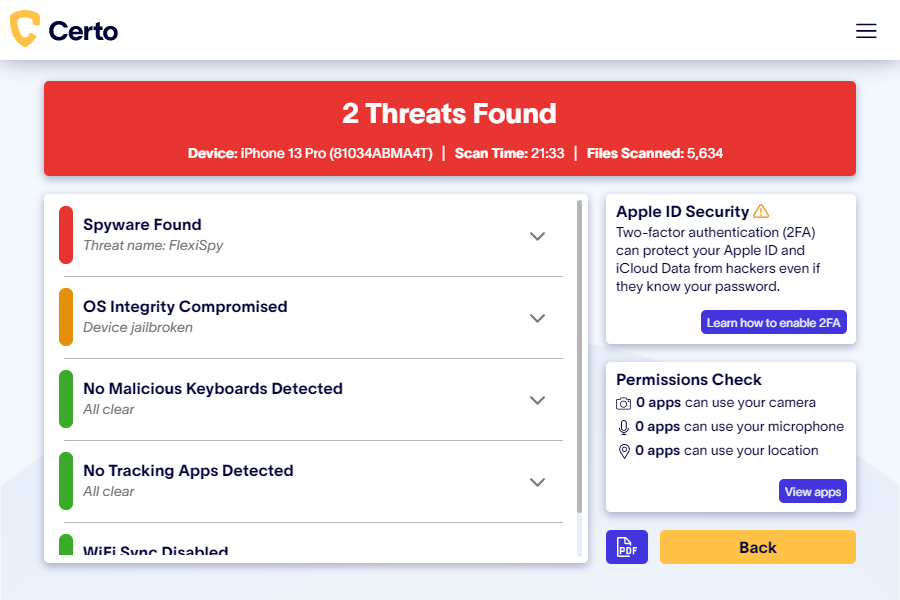
Detecting FlexiSpy is a simple process with an anti-spyware tool like Certo AntiSpy. Follow these steps to find out if someone has installed this spy app on your device:
- Install Certo AntiSpy on your computer.
- Connect your iPhone to your computer via USB.
- Click the Scan button and wait while your device is analyzed.
2. Review your installed apps
In order for a hacker to spy on your iPhone activity using FlexiSpy, they must install the FlexiSpy app onto your device. Searching your phone for this app can be a simple way to reveal FlexiSpy.
FlexiSpy gives their app a pretty innocent-sounding name in an attempt to avoid detection. Look through all of the apps on your phone’s home screen (including inside any app folders) and if you find an app called “Phone Monitor” or “System Core” then you can be pretty sure that FlexiSpy is installed.
Keep in mind, however, that FlexiSpy does give the hacker the option to hide the app icon. Therefore, if you suspect that you may have been targeted, it’s advisable to explore alternative detection methods in addition to this.

3. Check for a jailbreak
The FlexiSpy app requires your device to be jailbroken in order to access data on your phone and spy on your activity. Jailbreaking removes security restrictions from the device and allows non-approved apps to be installed, therefore a hacker will typically do this prior to installing spyware.
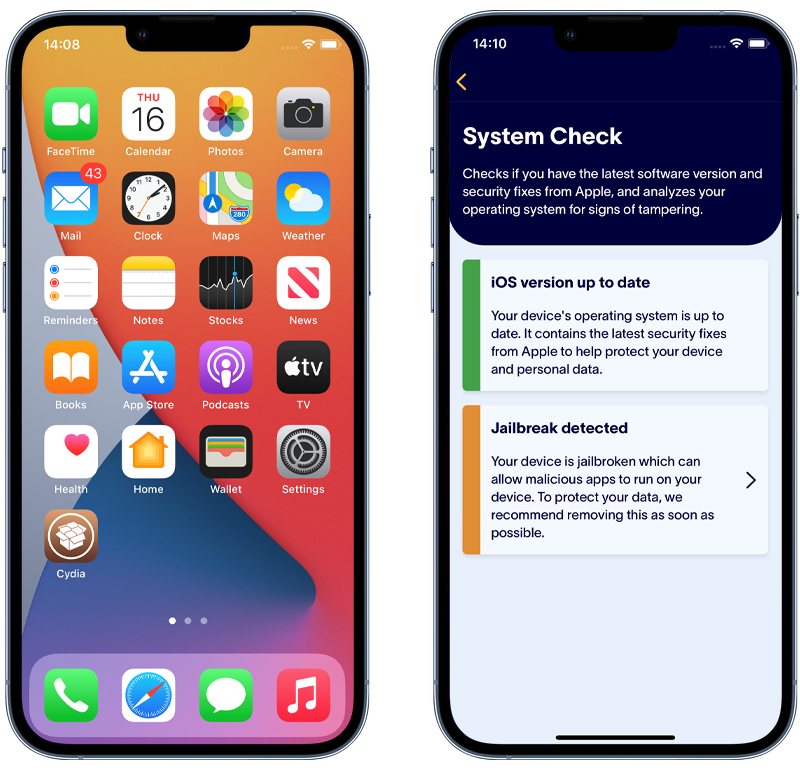
A jailbroken phone can be difficult to spot but look out for a strange app called “Cydia” or “Sileo” appearing on your home screen as one of these apps is usually installed as part of the jailbreak process.
Alternatively, there are also several free apps available from the App Store, such as Certo Mobile Security, that can check if an iPhone is jailbroken.
How to remove FlexiSpy from your iPhone
If you have found FlexiSpy on your iPhone using any of the methods mentioned above, it is advisable to remove it as soon as possible. Here are three methods that you can use to quickly remove FlexiSpy from your iPhone and safeguard your privacy:
1. Use Certo AntiSpy
Certo AntiSpy is an anti-spyware application, specifically designed for iOS devices that is very effective at detecting and removing a wide range of spyware, including FlexiSpy, even if it’s been hidden by the hacker. After the scan completes, just click the Remove button and Certo AntiSpy will either remove the threat automatically or provide you with simple step-by-step instructions to remove FlexiSpy permanently.
Run a scan for FlexiSpy
Download Certo AntiSpy now and run an in-depth scan for spyware and other cyber threats.
2. Update your iPhone
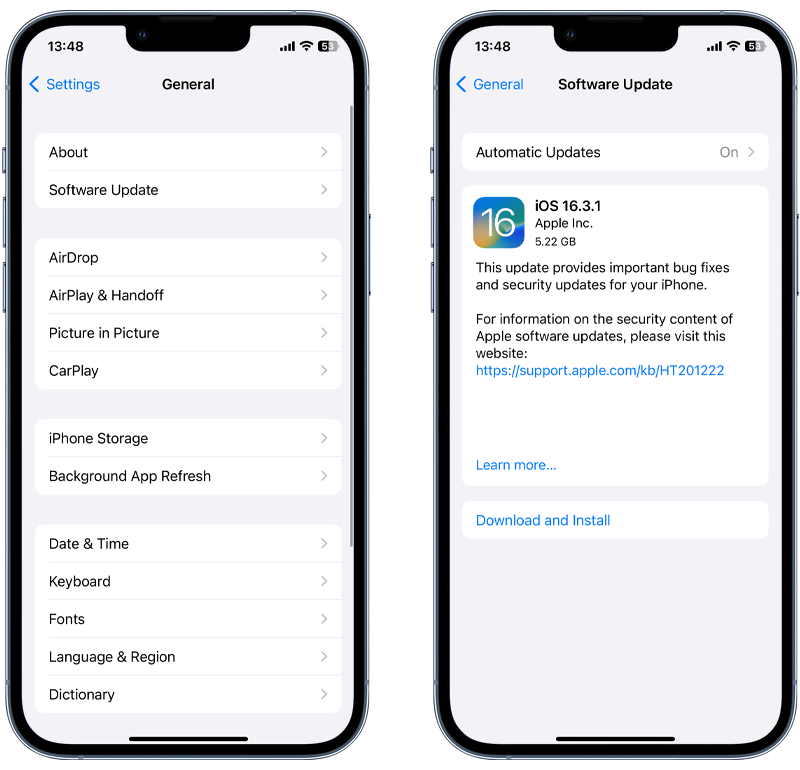
For FlexiSpy to function on your iPhone the hacker must first Jailbreak it, a process of removing Apple’s security restrictions. Updating your iOS version will remove any jailbreak present on your iPhone, thereby disabling FlexiSpy. You can check for and install any available iOS updates by going to Settings > General > Software Update.
3. Do a factory reset
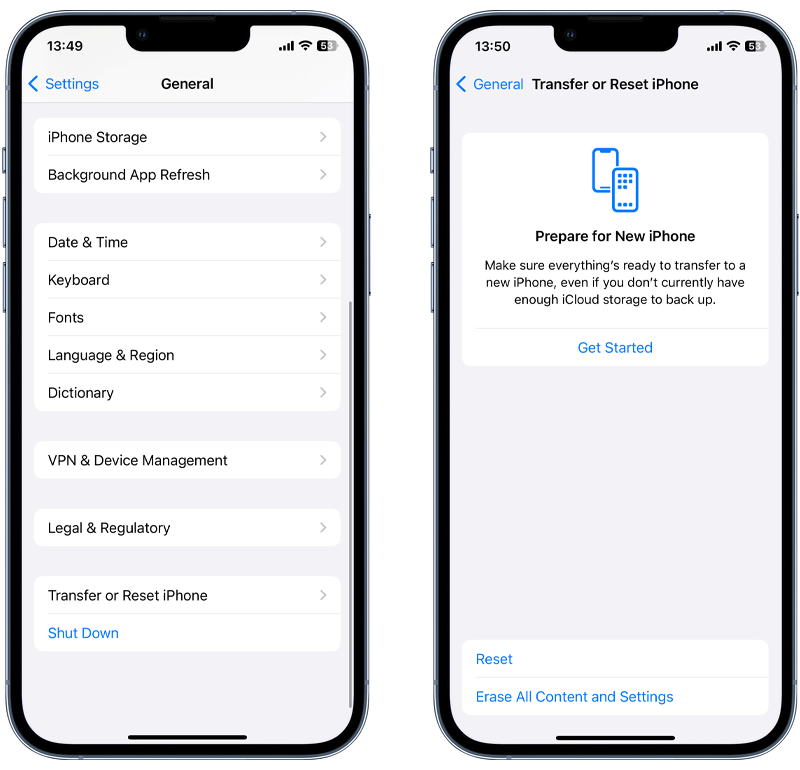
As a last resort, you can reset your iPhone to its factory settings to effectively remove FlexiSpy and other spyware from your device. However, note that this process erases all the data from your iPhone, including photos, messages, and apps, so make sure you backup all important data first. To reset, go to Settings > General > Transfer or Reset iPhone > Erase All Content and Settings.
Sophia is a Senior Content Manager at Certo Software, showcasing her deep-rooted expertise as an accomplished writer in the tech industry. With a genuine passion for cybersecurity, Sophia is a trusted source of insight and information.