How to Catch Someone Spying on Your Phone

By Simon Lewis
Updated:

Sometimes called stalkerware, phone spyware can be installed on your iPhone or Android device to monitor your calls, text messages, emails, location, and even your photos.
If you notice strange things happening on your cell phone—like unusually high data usage or if it’s suddenly slow—it could be possible that spyware has been installed on your device.
We’ve discussed before how to determine if your phone has been hacked or if someone has been spying on your phone. But in this article, we will cover some of the ways you can actually catch someone in the act of spying on your phone.
Catch phone snoopers with Certo
Certo's award-winning spyware detection tools for iPhone and Android are trusted by millions worldwide.
The Top Signs Someone Is Spying on Your Cell Phone
Before we discuss how to catch someone spying on your phone, let’s quickly look at some common signs that your phone is being spied on.
- Battery usage: Your phone loses charge quickly because spyware drains a lot of battery life.
- Performance issues: Your phone can start running abnormally slow if it’s busy processing hacking apps.
- Strange activity on your social media apps: If a hacker has gotten into your phone, they can get into your social media accounts.
- Unusual text messages: Hackers might be using an SMS trojan or impersonating you to steal data from your contacts.
- Heat: If your phone is getting unusually hot, this might be because there is malicious software running in the background.
Why Would Someone Be Spying on Your Phone?
Now that you know what signs to look out for, you may want to know why someone would want to spy on your phone.
Understanding why someone would want to spy on or hack your phone can help you prevent it from happening.
You feel you are being controlled or watched
If you feel like someone is watching you, and they seem to show up wherever you go, it could mean someone is spying on you and might very well be doing so via your phone.
Someone may behave this way if they always want to know where you are because they are controlling or paranoid.
To steal from you
Another reason a snooper may tamper with your phone is to get access to your personal information so that they can get into your online accounts. From here they can do things like steal money or make other transactions that would benefit them.
For fun or notoriety
It may sound strange, but some hackers get a thrill out of the challenge of successfully pulling off an attack on your Android or iOS device.
Because it’s easy to do
Smartphones—and Android phones in particular—are relatively easy to hack, especially if someone has physical access to your phone.
If someone gets hold of your cell phone, it’s not hard to install spyware that could snoop on your installed apps.
These days, there are some seriously sophisticated spyware apps out there that make it quite simple for a hacker to monitor your phone calls and texts and even get access to your private information.
How to Catch Someone Spying on Your Phone
While there are ways to tell if your cell phone is being spied on, and there are things that you can do to stop this from happening, you may also need to know how to physically catch someone in the act of spying on your phone.
Scan your phone with anti-spyware apps
The easiest way to discover if someone has tried to install spyware on your iPhone or Android smartphone is to scan your phone with security software like Certo AntiSpy (for iOS devices) or Certo Mobile Security (for Android devices).
All you need to do is install the software either on your cell phone or your computer and then run a quick scan of your device.
Our anti-spyware products will allow you to detect if a spyware app or malicious software is running on your phone. This software will also help you remove any spyware detected on your mobile device.
If you discover a spyware app installed on your Android or iOS device, you can follow the steps in this article to find out who hacked your phone.
Anti-spyware apps like our Certo Mobile Security can be set up to run regular scans to give you peace of mind that no one has hacked your phone.
Catch the snooper in the act
If you are determined to catch someone in the act of spying on your phone, then you can lay a ‘trap’ for them. The best way to do this is to install an intruder detection app that takes a certain action when someone tries to spy on or tamper with your cell phone.
The Certo Mobile Security app for Android devices is the best way to catch someone in the act. This feature is also coming to Certo Mobile Security for iOS soon.
How it works
The app will take a silent photo using your front camera of whoever is trying to spy on or hack your phone. The camera is triggered when the phone is moved while left unattended or if someone enters an incorrect password three times.
The image below shows how the Certo Mobile Security app works and what the silent photo will look like.
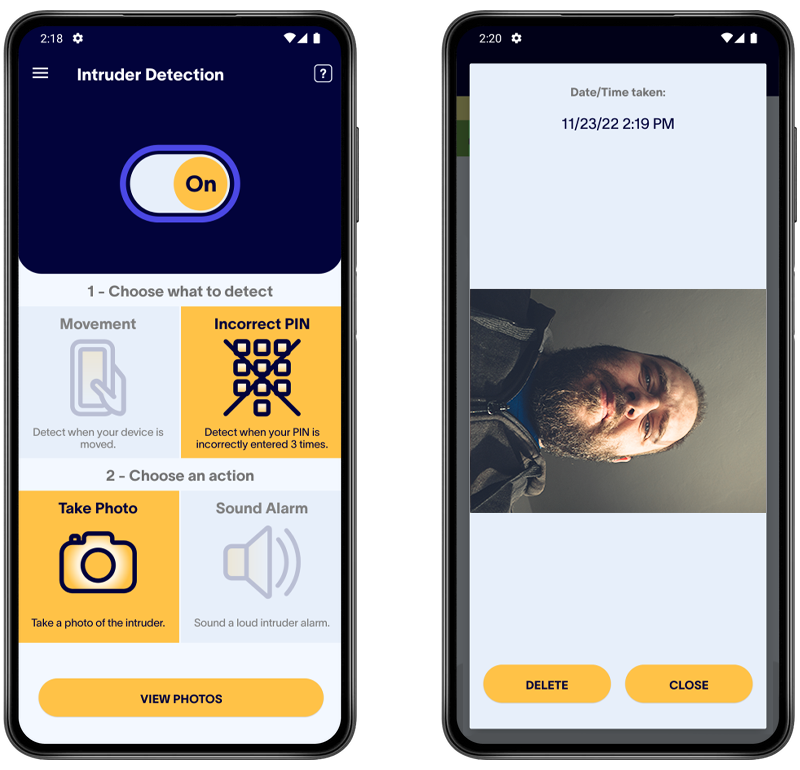
This way, you will be notified when someone tries to access your phone, and you will have proof of who is trying to spy on you.
Using this method will help you identify who is tampering with your phone and trying to spy on you.
The alarm feature can also act as a deterrent for any would-be hackers.
Use false information (misinformation)
If you have suspicions that someone is listening in on your phone calls or monitoring your text messages, then you might want to develop a plan to spread some information that isn’t true.
This can help you to determine exactly who is intercepting your text messages or other private data from your cell phone.
For example, let’s say that you text your friend a ‘fake secret’ about yourself that you both agree beforehand not to tell anyone else.
If that secret makes its way back to you – you know that someone has been spying on you and monitoring your text messages.
You can then trace that information back to the original source and hopefully find the identity of your hacker.
Important: Be careful not to put either yourself or others in danger if engaging in misinformation.
Set trap SMS messages
You can set a trap using SMS messages to find out if you’ve been hacked.
This is done by sending a link to a friend that would be tempting for a hacker to open. Make sure your friend doesn’t open the link.
This link will track any visits and record some basic details of the person who visited it. If the link is opened, you know someone else is reading your messages.
Here’s how to set this up:
- First, go to https://iplogger.org/shortener/
- Enter a link for the hacker to be taken to. It can be any website you want, like Google or Facebook. Then click “Shorten.”
- You’ll be given a link for “Collecting Statistics.” This is the one you should send in a text message, which will take someone to the website you set above. The link will look something like https://iplogger.org/29MRQ5.
- Don’t open this link yourself, as your visit will be recorded, and it might be difficult to work out if you or someone else has visited the link.
- Make a note of the “Link for viewing statistics.” You’ll need to go back to this later to see if anyone has clicked your link.
- Then go ahead and compose a message to your friend, include the link (asking them beforehand not to open it) and something that would entice a snooper to visit it, then hit send.
All you need to do now is check back on the “Link for viewing statistics” every so often. If it says the link has been visited, then it’s a pretty strong sign that someone is reading your text messages.
Tip: You can select a different domain name if you don’t want “iplogger.org” in the link.
What to Do if You Catch Someone Spying on Your Phone
If one of these methods works and you can identify that someone has tampered with your iPhone or Android device, there are some things you can do to remove spy software and keep your phone safe.
Use a security app to remove spy apps
The first thing you should do if you discover that there is spyware on your phone is to use an app that can remove it completely.
Our apps will scan your device and notify you of any suspicious apps on your phone. You can then quickly remove any spyware with one simple tap.
Find spyware fast!
The easiest way to find out if your someone is snooping on your device is to run a quick spyware scan.
Check which apps have access to sensitive permissions
It’s normal for some apps to have access to your camera, microphone, and GPS location. For example, Google Maps would need access to your location to function.
However, if a suspicious app has access to these permissions, this could be how a snooper is spying on you.
Visit your settings app to check which apps have sensitive permissions and remove permissions for any apps that you don’t recognize.
Enable two-factor authentication
All the apps that you have on your phone that give you access to an online account, such as a banking app, usually provide you with the option to add two-factor authentication to them.
This basically means when you try to log into these online accounts, a unique code will first be sent to your device that you would need to enter into the app to prove your identity.
You might also want to consider changing your iCloud or Google account password regularly and enabling two-factor authentication as well.
Update your operating system
Many spy apps rely on vulnerabilities in out-of-date operating systems in order to function. Doing a software update—which updates your operating system—can immediately break many spy apps.
If no software update is available, you may want to consider factory resetting your phone…
Factory reset your phone
Factory resetting your cell phone will completely remove any spyware that is installed. A factory reset restores your phone to the state it was in when you bought it.
You don’t need to worry about losing all your information during a factory reset, you can back your data up before resetting your phone. Backing up your data doesn’t mean you’ll back up the spyware either.
Final Thoughts
If your aim is to catch someone snooping on your phone, the best thing you can do is download our Certo Mobile Security app for Android devices and activate the Intruder Detection feature. This feature will soon be included in our iOS product, too.
This is a powerful way to detect if anyone is attempting to tamper with your phone if they have physical access to it.
Download our app, and—within seconds—you can set up the Intruder Detection and find out if someone is spying on your cell phone.
By Simon Lewis
Co-founder of Certo Software, Simon has spent over 15 years pioneering cybersecurity solutions. A respected industry expert, he continually shares his wealth of knowledge through engaging discussions and insightful written pieces.